Features
Manage Mappings
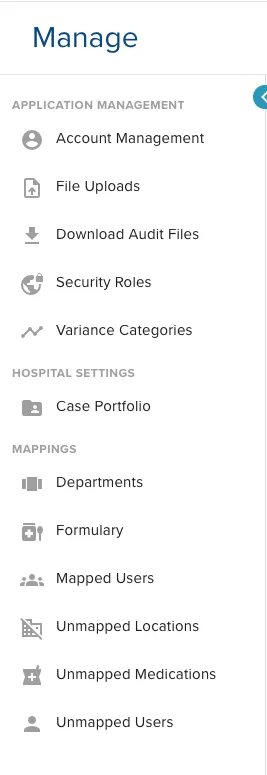
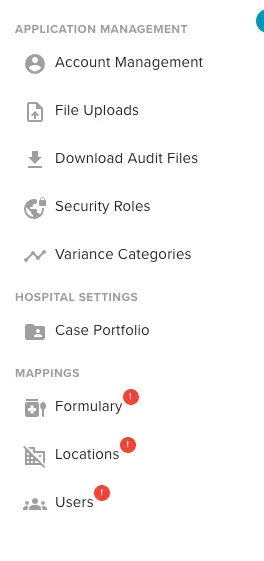
The ControlCheck product development team has trimmed down the quantity of Mappings options and have folded all “Unmapped” capabilities as tabs within in their relevant Mappings categories. Therefore:
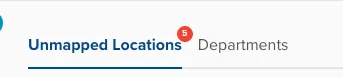
- Unmapped Locations is a now a tab within Departments
- Unmapped Medications is now a tab within Formulary
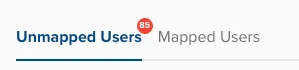
- Unmapped Users is now a tab within Mapped Users
Additionally, the red “Action” badge behavior has changed due to performance reasons. A red exclamation point badge has replaced the red number badge in the navigation bar. However, the badge with the number of unmapped actions has been added to the tabs where the unmapped actions now live.
As we’ve been building new functionality to map meds across multiple locations, a pre-requisite is to remove the obsolete “Unmapped Medications” section. Removing only this creates a subpar design experience, so we’ve moved the Unmapped Locations & Users capabilities to create UX consistency.
Old Look Before Cleanup
New Look After Cleanup
Examples of the new tabs:
Bug Fixes
Reporting
Resolved Issue where KPI Reports generated by the group by care area are resulting in an empty care area column in the export
ControlCheck Basics customers can download the KPI Report, as expected
For power users generating an extraordinary quantity of reports, we resolved an issue where ControlCheck prevented users from accessing the report inbox
Event Summary reports now display deleted users who had submitted attachments to the Event Summary, as expected.
Was this article helpful?
That’s Great!
Thank you for your feedback
Sorry! We couldn't be helpful
Thank you for your feedback
Feedback sent
We appreciate your effort and will try to fix the article