Features
Prism Assistant
Long Term Memory
With the addition of long-term memory, Prism Assistant in ControlCheck evolves into a persistent, context-aware AI partner. Rather than starting fresh with every session, Prism can now retain information across conversations — taking your preferences, workflows, and priorities into account when generating responses.

In practice, this means users can tell Prism things once — preferred report formats, which drugs are monitored most closely, how you’d like what information prioritized — and Prism will carry those preferences forward into future sessions. Over time, Prism becomes increasingly calibrated to the way each individual operates, reducing the need to re-explain context and making interactions faster and more accurate.
Get Started with These Examples
- "Act as my diversion investigation partner. I'm a diversion analyst, and when I ask about open variances, proactively surface trends across units over time — flag any units with a pattern of recurring variances in the last 90 days, note which drug classes appear most frequently, and always remind me if a provider has had prior cases.”
- "When I need to escalate a finding to pharmacy leadership, help me draft a summary in a formal, concise tone that includes the drug name, quantity discrepancy, affected unit, and a recommended next step — no bullet points, just a short paragraph I can paste into an email.”
- "Every Friday afternoon I do a week-in-review. When I ask for my weekly summary, give me a count of new variances opened, how many were resolved, any unresolved items older than 7 days, and one sentence on whether this week looks better or worse than last week. I prefer bar charts over pie charts.”
Improved Context on Provider Roles
Prism now has direct knowledge of roles assigned to your mapped users.
- Role Understanding — Prism can now look up the list of available provider roles at a facility.
- Improved Provider Search — Provider search has been expanded search by role types meaning it can accurately retrieve all providers mapped to a specific role like "Float Nurse."
- Provider Role & Care Area Mapping — Prism can now access the hospital's configured mappings between roles and care areas, giving it the context to understand not just who has a role, but where those providers typically operate.
Together, these changes mean Prism can correctly interpret role-based queries and return accurate, targeted results rather than guessing or misclassifying the request.
Example:
- "Show me event summaries for all CNRA Student providers over the last 30 days. I want to see which care areas they've been active in and whether any of them have open variances tied to their dispenses."
- "Compare total morphine and hydromorphone transactions last month between providers with the Float Nurse role versus RN. Break it down by care area and tell me if float nurses are dispensing at a higher rate relative to their hours in each unit.”
Tweaks for Ease of Use & Accuracy
The following Prism enhancements have been identified and implemented based on feedback from real users utilizing our thumbs up/down capability - please help us find new use cases by providing continuous feedback!

Flexible Prompting for Multi-Chemical Medications
Prism’s reliance on strict matches for medications listed in the formulary has been relaxed, allowing for searching of Multi-Chemical meds in any order.
- i.e. prompting for HYDROcodone-Acetaminophen vs. Acetaminophen-HYDROcodone
Improved Search for Equivalent Medications
This enhancement addresses a reliability issue where Prism struggled with medication names when it encountered an equivalent medication ID it couldn't resolve. This situation was most obvious when Prism’s assessment of a provider’s IRIS score contradicted the actual IRIS Detailed Analysis itself.
Example:
- “Provide an analysis of Jane Doe’s Med Trends score over the past 3 months.”
Provider Panel - Reviews & Cases Tab
We’ve added the IDs of Review & Cases to this list to improve team collaboration and identification of these workflows.
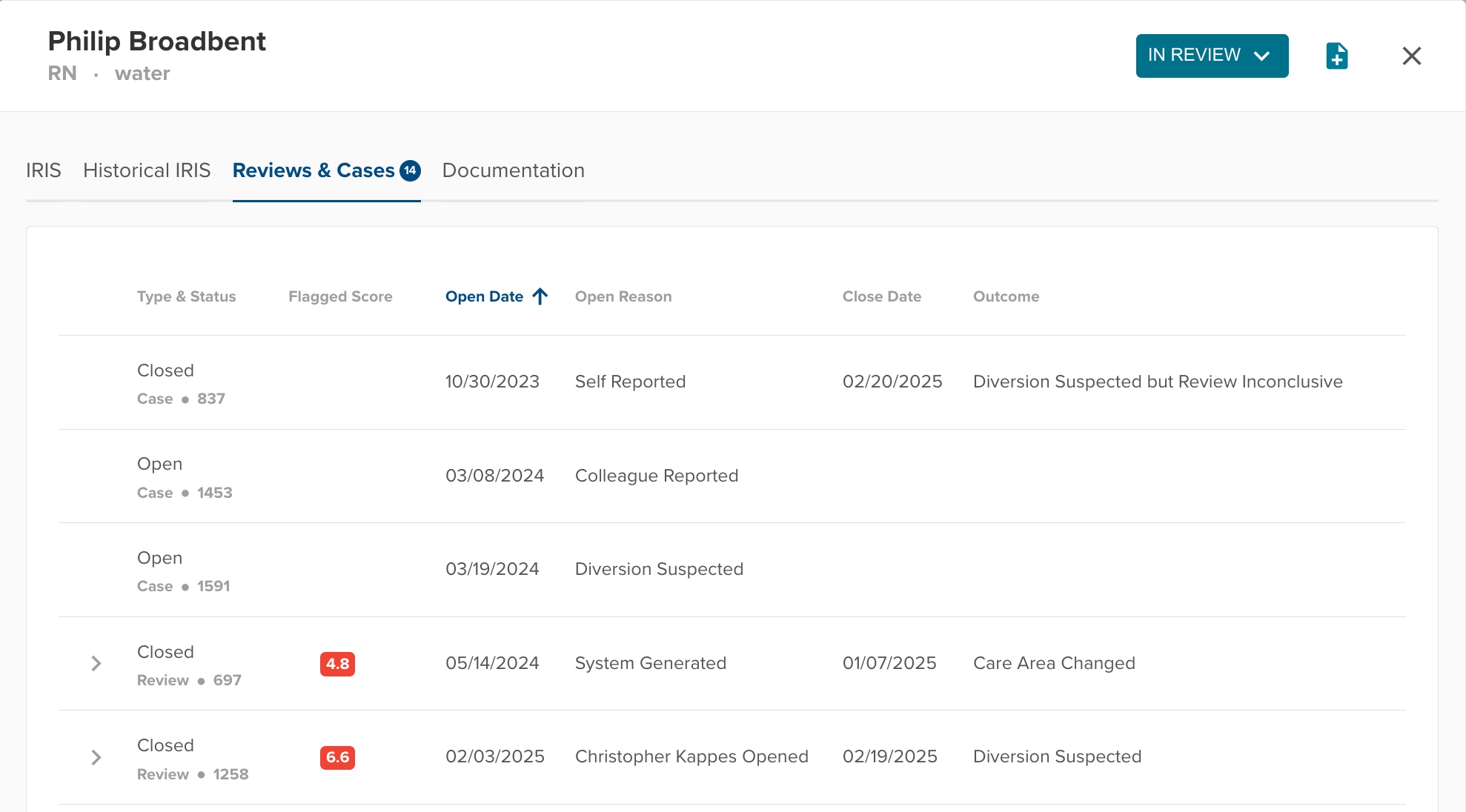
Provider Panel Bug Fix
- Resolved intermittent issue where the blue numeric badge of the Reviews & Cases tab would incorrectly indicate that 0 total Reviews or Cases were associated with the provider.
Bug Fixes
- Resolved issue with Pain Related Analysis UI where a form factor switch was incorrectly labeled for concentration downgrade.
- Resolved an issue with the drug filter of the Patient Care Audit Table - previously, opening the filter then closing without any changes could incorrectly increase the numeric badge associated with the filter. Now, it shows the correct quantity of drugs filtered for every time.
Was this article helpful?
That’s Great!
Thank you for your feedback
Sorry! We couldn't be helpful
Thank you for your feedback
Feedback sent
We appreciate your effort and will try to fix the article