Features
Bulk Ignore Medication Mappings
Bulk ignoring medications is a critical optimization feature in ControlCheck that allows healthcare systems to improve system performance and reduce noise within their audit tables. When medications are marked as "ignored," the system no longer processes or stores events related to these medications across both patient care and pharmacy modules. Bulk ignoring allows your diversion monitoring team to focus only on medications that matter for controlled substance compliance.
Feature Capabilities
- Ignore a single medication at the hospital you are logged into
- Ignore a single medication across many hospitals associated with your IDN
- Ignore multiple medications at the hospital you are logged into
- Ignore multiple medications across many hospitals associated with your IDN
How It Works
- From the unmapped medications list within the formulary, select all drugs you are interested in ignoring from mapping activity.
- Decide if these medications are to be ignored at your current hospital or across many hospitals
- Click Continue
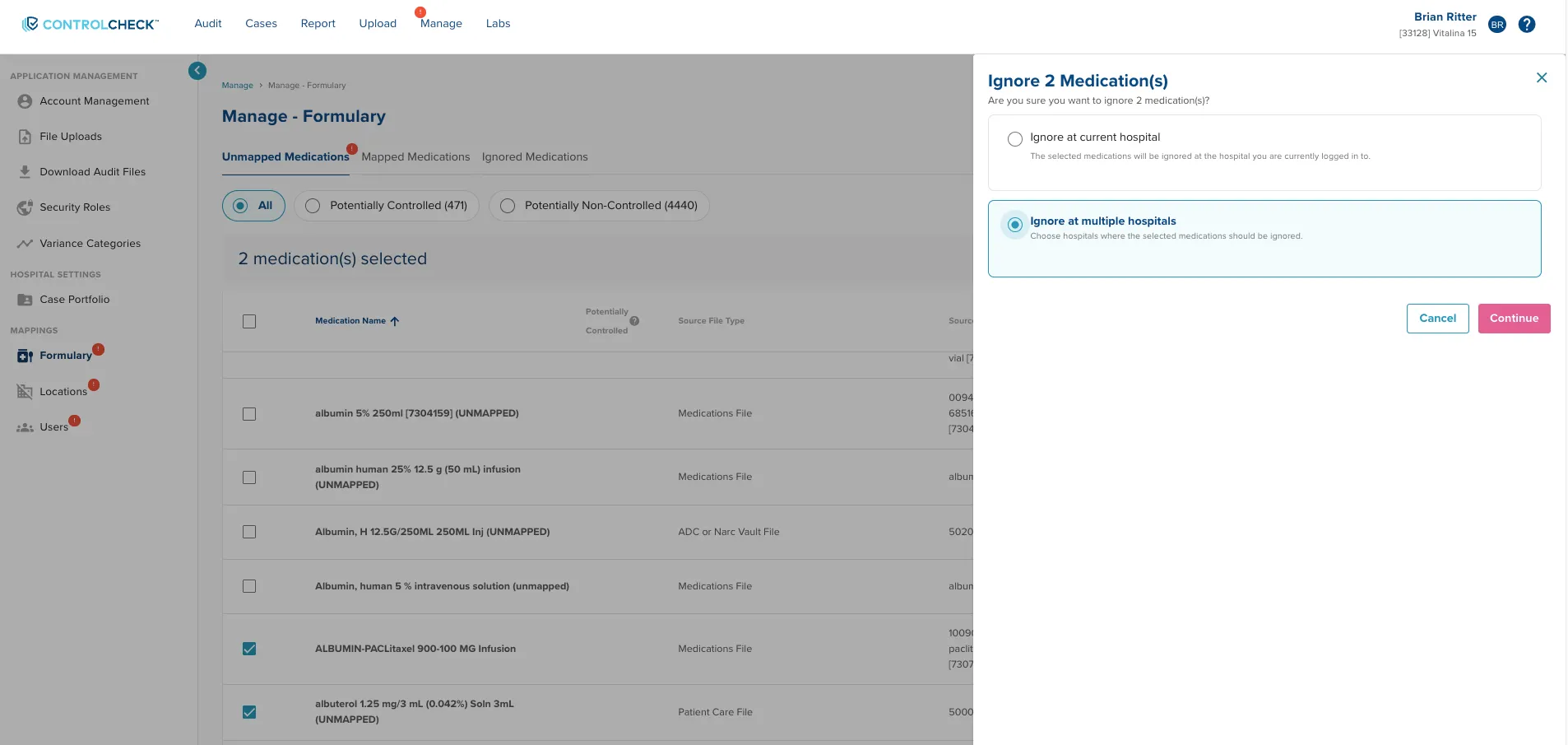
Here, users decide if their medication selections should apply to one hospital or many
4.1. If ignoring only at the current hospital, ControlCheck will process the request and return the user back to the unmapped medications tab in the formulary
4.2. If ignoring across many many hospitals, the user will proceed to select which locations within their IDN that the bulk ignore operations should occur. The returned list of locations respects the security access controls for which hospital that user has visibility into
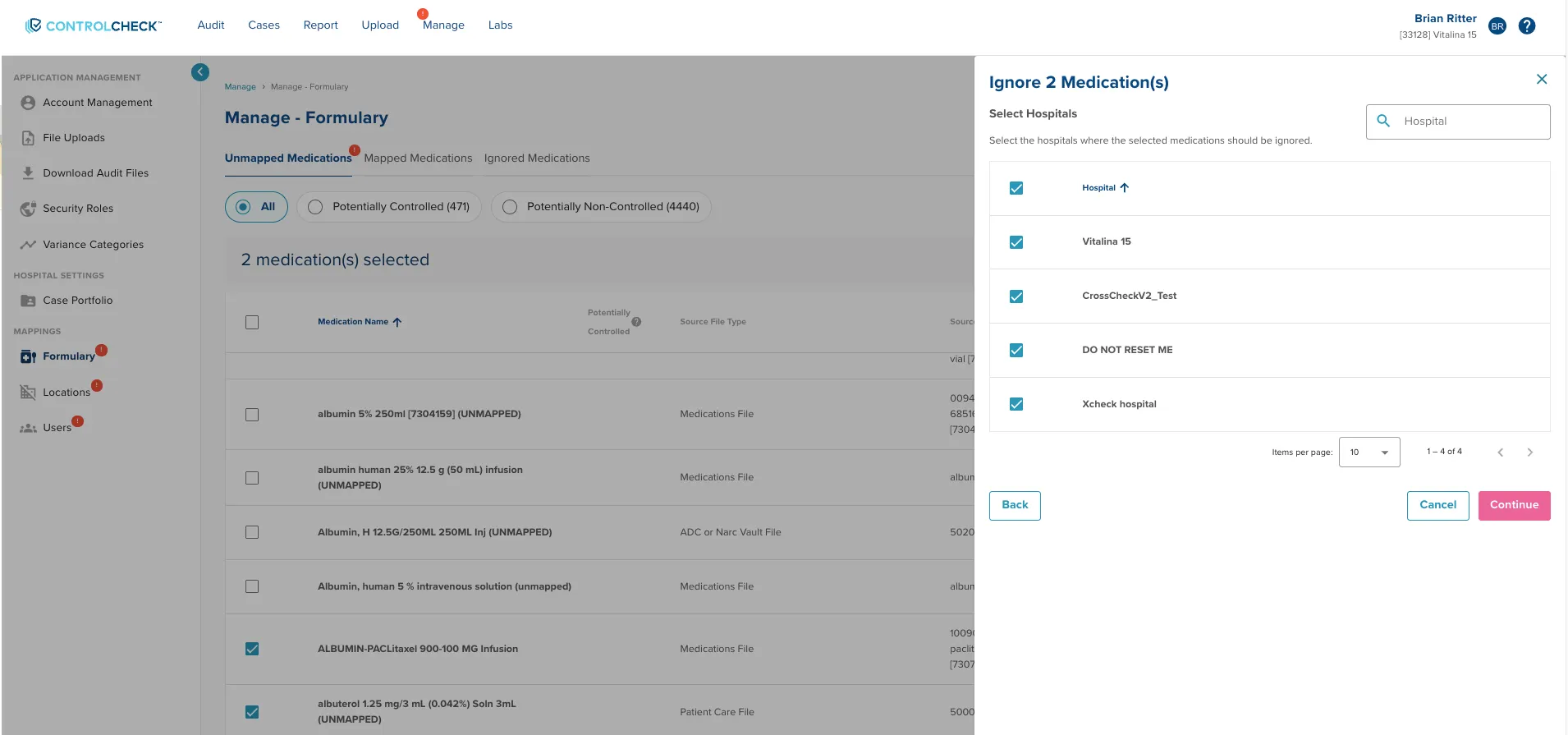 Use the table in the bulk ignore panel to quickly select all locations or pick out a few specific locations to ignore the medication at
5. When all desired locations are selected, click Continue
6. ControlCheck will the process the request and return the user back to the unmapped medications tab in the formulary
Quickly Login into a Specific ControlCheck page!
When logging into CheckCheck via a specific URL, users will be taken directly to the desired page after logging in and selecting their hospital
- Last release, we removed a feature that would auto-navigate users to a desired page after login. While this provided a notable speed improvement, we wanted to bring back this capability back to long time users who had benefited from the feature.
Landing into a specific page after login is supported for most, but not all pages within ControlCheck.
- Supported Pages:
- /Dashboard (Default Landing Spot)
- /audit-review
- /parmacy-audit
- /analyze/nursing & /analyze/or
- analyze/idn-reviews
- /analyze/multi-hospital-users
- /analyze/nursing/review-oversight
- /analyze/or/review-oversight
- /cases
- /report
- /manage
- All pages within retail pharmacy module
- Unsupported Pages:
- /cases/portfolio (individual case page)
- /analytics-report
- All Investigate Data Pages
- Pages within the /manage module side bar (e.g. Security roles, Formulary, Account Management)
- Supported Pages:
Steps to Setup:
- In your browser window, you can enter the specific URL of a ControlCheck Page (ex. https://controlcheck.bluesight.com/audit-review)
1.1 You can also utilize browser bookmarks to navigate to this specific URL
- Login into ControlCheck
- Select the Hospital Site you want to view
- See that ControlCheck will take you straight to the Audit Review page, rather than the dashboard, after login
Bug Fixes
- Fixed a medication mapping issue where a recently mapped medication would still appear on the unmapped list if users stayed within the Manage Module
- Resolved an issue where audit filters stick when switching between hospitals, which created problems as some filters (such as department or provider) are hospital specific
- When users are assigned an event summary, the buttons and cards update and turn pink, as expected
- Adjusted table sorting to be case insensitive to avoid sorting situations where capitalized letters were not adjacent to words beginning with the lower case version of the same letter
- Fixed a bug where the PDF download from the Documentation Accuracy became non-functional. It now works as expected
- When mapping medications to multiple hospitals, users will now see a success banner indicating that the mapping request has been received and is in progress
Was this article helpful?
That’s Great!
Thank you for your feedback
Sorry! We couldn't be helpful
Thank you for your feedback
Feedback sent
We appreciate your effort and will try to fix the article